 Astal Creates
Adobe Tags Exporter
Export an Adobe Launch container to Excel and audit it, entirely in-browser.
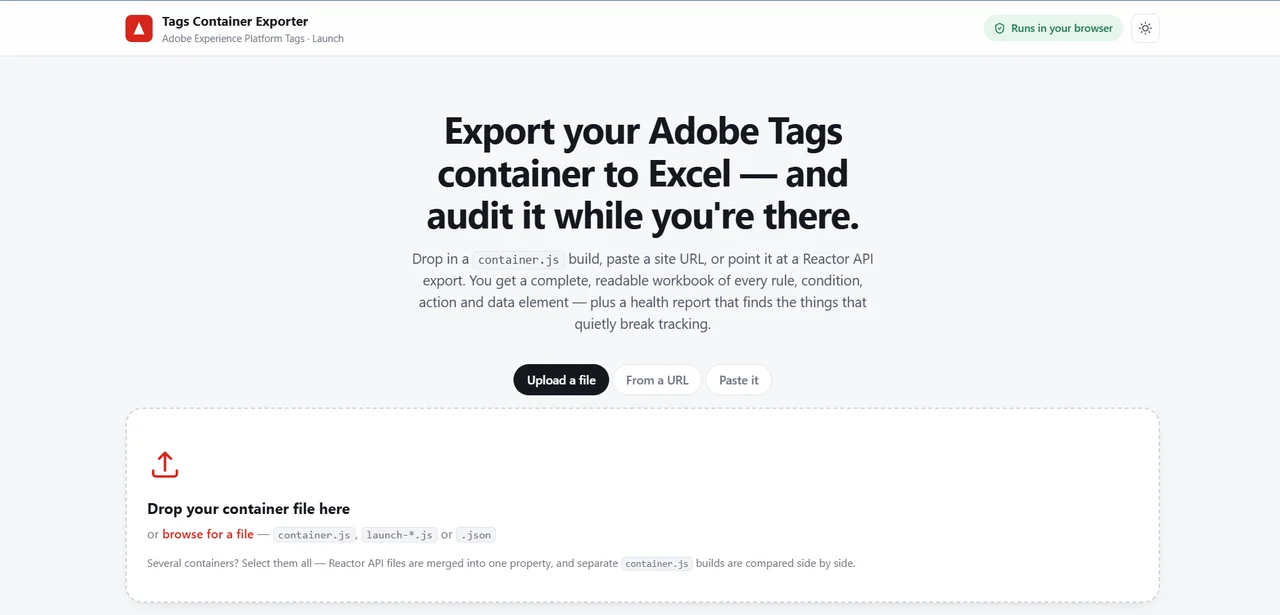
A zero-dependency static web app that turns an Adobe Experience Platform Tags (Launch) container, either a runtime container.js build or a Reactor API JSON export, into two Excel workbooks: a full inventory and a health audit. It runs 36 weighted checks, decodes rule logic into plain English, maps the data-element reference graph, and weighs every object in the container. It is built for analytics engineers and tag managers who need to review, document, or hand off an Adobe Tags property.
Why it needed to exist
Google Tag Manager lets you download a container as a spreadsheet; Adobe Tags has no equivalent, so reviewing a property means clicking through the Launch UI rule by rule. Existing alternatives require uploading container data to a third-party service, which is a non-starter for the client analytics implementations these files describe.
Inside the product
Two Excel workbooks
A 15-sheet output: an 8-sheet inventory (Overview, Rules, Rule Components, Data Elements, Extensions, Custom Code, Container Weight, Data Element Usage) plus a 7-sheet audit (Health Score, Findings, All Checks, Orphans & Dead Weight, Decoded Rules, Runtime QA Checklist, Custom Code Audit).
Weighted health score
36 checks scored across four categories with fixed weights: Integrity 40%, Efficiency 25%, Code Quality 20%, Governance 15%, each finding penalised by severity.
Condition decoder
decoder.js translates raw extension module settings into readable WHEN … IF … THEN … sentences instead of leaving reviewers to read JSON.
Orphan detection
Builds a reference graph across rules, data elements and extensions to flag data elements nobody consumes, extensions no module uses, and rules missing an event or action.
Container weight analysis
Measures per-object bytes and ranks them, distinguishing authored configuration weight from served library file size, with a multi-container comparison mode.
Three intake routes plus a built-in guide
File upload, paste, or a site URL that finds the tag in the page HTML; the homepage documents five ways to obtain a container (library, network tab, console, Reactor API, archive).
Generated runtime QA checklist
qa.js produces a container-specific checklist across eight groups (Installation, Data layer, Rules, Network calls, Identity, Consent, Monitoring, Deployment) covering what a static file cannot prove.
No code execution, no upload
Containers are read by a hand-written recursive-descent parser, never eval, under a CSP with no unsafe-eval and no unsafe-inline.
End to end
- The user supplies a container by file, paste, or site URL; the URL route tries a direct browser fetch first and falls back to an optional serverless resolver only when CORS blocks it.
- jsobj.js reads the JS object literal without executing it, capturing functions and regexes as text markers; parser.js normalises both runtime and Reactor shapes into one model.
- audit.js builds a usage graph and custom-code inventory, detects the implementation profile (classic, Web SDK, or dual), then runs the check registry to produce a weighted score and located findings.
- The interactive report renders in-page; xlsx.js and zip.js build the two .xlsx files client-side (SpreadsheetML written by hand, DEFLATE via CompressionStream) and hand them to the browser as downloads.
Closing an SSRF hole with DNS pinning
The URL-intake feature needs one server-side fetch of a user-supplied address, which makes it an SSRF target. The original guard resolved the hostname, checked every address against private ranges, then passed the hostname to fetch, meaning the runtime resolved it a second time, so a DNS answer that flipped to 169.254.169.254 between the check and the connection would be dialled without ever being validated. The fix drops fetch for Node's http/https modules and overrides the socket's lookup callback to return only the pre-validated addresses, so the hostname still drives SNI and the Host header while the connection can only reach an address that passed. It is tested against a hostname with no DNS record at all, pinned to a local fixture: a successful request proves the socket followed the pin rather than a resolver. A second, separate problem: the brace scanner that locates the container object broke on minified code containing return /[}{]/, because its regex-vs-division heuristic only inspected the previous character. Adding keyword-aware token lookback fixed containers that had previously failed to parse at all.
Where it stands
Deployed on Vercel with no runtime dependencies and no build step: devDependencies is empty and every asset is a plain script attaching one global. Test coverage is 243 Node assertions across three suites plus 132 Chromium assertions, all passing; the browser suite runs a second origin to exercise both the working and CORS-blocked URL paths against real browser behaviour. Verified against a real container of 319 rules and 358 data elements: 120 ms to parse, 77 ms to audit, and about 220 ms to build both workbooks.
The full stack
- Vanilla JavaScript (ES5-style, no transpiler)
- HTML
- CSS
- Node.js
- Vercel serverless functions
- Web Streams CompressionStream
- Blob / File APIs
- Adobe Reactor API (JSON:API)
- Adobe Launch container.js runtime format
- Playwright / Chromium (tests)
- Vercel
Continue along the river
Want something built like this?
This is one of several products shipped under Astal Creates. Tell me what you're building and I'll write back.